
Twitter Status Board

Several months ago, I noticed that one of the nearby offices was using a whiteboard mounted outside their office door to keep people informed of their comings and goings. “That’s good communication!” I thought to myself, “but my team is made up of geeks. Surely we can do something nerdier!”

Thus was born an experiment with Twitter that is yielding some good results. It began with our six-person development team: programmers who were interested in participating set up a twitter account and began posting what they were up to through the day. We subscribed to each other’s updates and easily keep a finger on the pulse of the team’s activity. (This was especially helpful when working off-site or stuck in meetings.) In addition to the standard Twitter functionality, we also wrote a little Rails app that uses Twitter’s APIs to build a replacement for the old-style In-Out board. People can pull up the status screen from a web browser or look at a monitor we stuck in the window of one of our cubicles to see at a glance who was around and what they were up to:
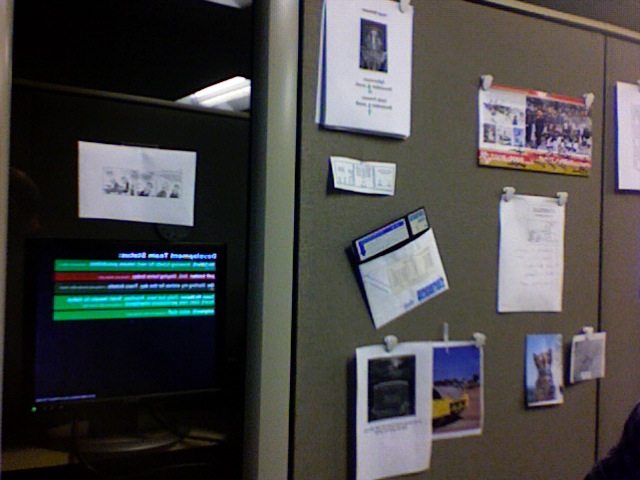
Status Board In Situ

Status Board In Situ

After a month of voluntary participation, we had a meeting to discuss whether it was worth keeping up, and decided that the minimal effort required to improve our communication was well-spent. We’ve been using the system regularly for several months now. (One interesting side-effect that I’ve noticed is that it helps me to keep on task a little better: when I post that I’m working on ticket #726, I feel a little guilty if I’m not actually working on it!)

Of course, people walking by quickly noticed the screen and asked whether it could be expanded to include other people as well. At my boss’ requenst, we put together another status screen for use at the department’s front desk, where the people there can quickly ascertain whether a call can be transferred or a visitor directed back to someone’s office. It looks like this (with strategic blurring to protect the unwitting):
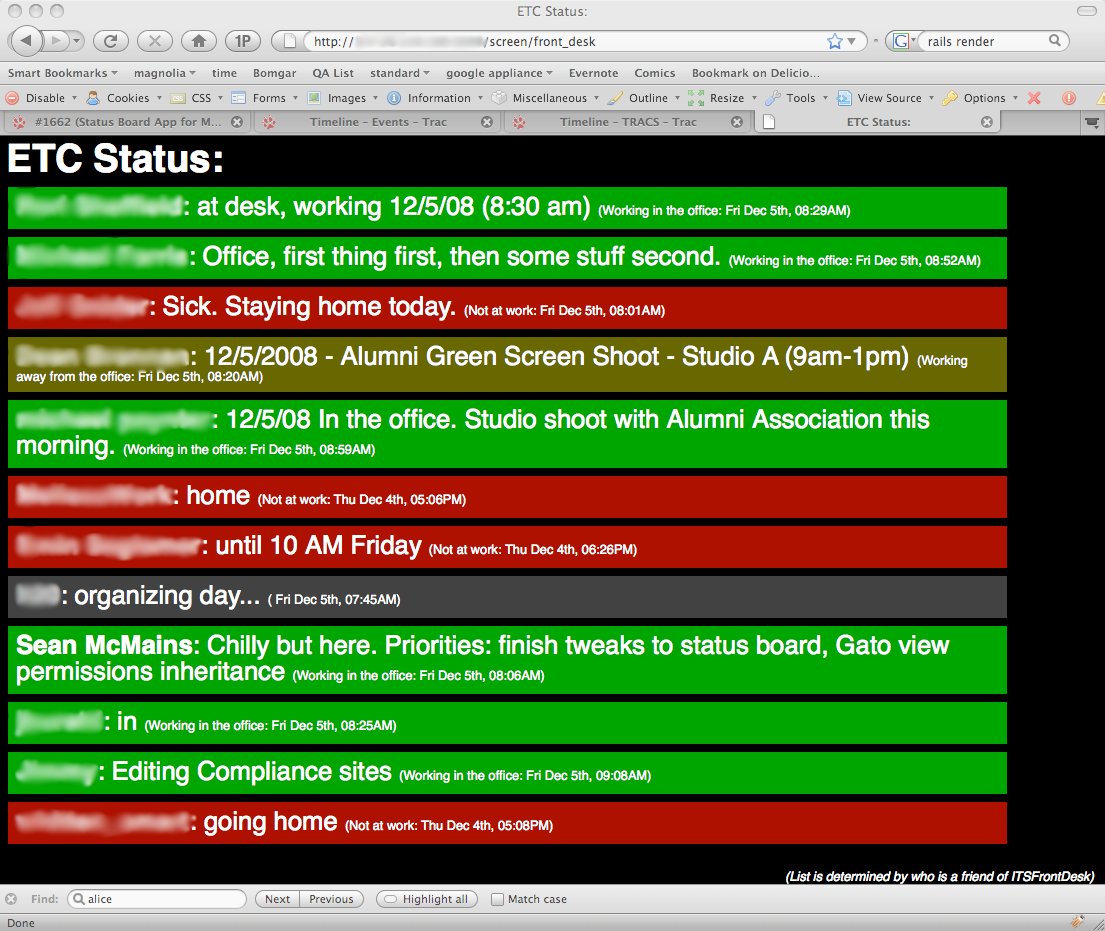
Front Desk Status

Front Desk Status

The color-coding is done by preceding a status update with “IN:”, “OUT:”, or “OFF:” (for those times you’re working but not at your desk), a feature of our status board app. While some of the folks around the department were initially a bit skeptical, they have quickly become enthusiastic once they use it for a day or two. The front-desk folks decided that they’d rather have timestamps than the “x hours ago” notation we’d originally used, so we tweaked the app to better meet their needs.

We’re still refining our software (I need to make the caching smarter), there are at least two other Status Board applications under development in the department (using Javascript and FLEX), and I now quickly hear about it if something goes wrong with the system. It should be interesting to see where this thing goes over the next few months! (If there’s interest, I can clean up the Rails code and open-source it once I finish the caching improvements.)

High Ed Web 2008

I’m currently at the High Ed Web 2008 conference in Springfield, MO. The conference is geared to web professionals in Higher Education, and is an interesting combination of marketers, technical folk, and the occasional vendor. There’s lots of good information to be had (as well as an immense amount of equally good food — who suspected that “travel is broadening” should be taken literally?), and all of us who are attending are getting a lot out of it.

Yesterday afternoon, James, Jeff and I did our planned presentation: University-Wide CMS Implementation: Failure, then Success. We had a lot of fun with it, taking a pretty irreverent approach to the history of our CMS project, and using some cool 3D timeline software to present our information in an interesting way.

Conference attendees have been using Twitter to communicate about the conference pretty extensively, so I told people at the start of our presentation that I wanted them to help me make all the people in other sessions feel as bad as possible for missing ours. Toward that end, I encouraged them to post the most outrageous lies about our presentation they could think of. Here’s the Twitter chatter that was posted during our presentation:

  • jesseclark: I have recieved more temp tattos in the past two days than the last 10 years!
  • tonydunn: live mexican wrestling in SAC4 session! AWESOME!!
  • stomer: Admiring the wrestling masks at SAC4
  • carlenek: SAC4, CMS Failure then success. They just gave each of us $5!!
  • stomer: In unison “politics”
  • stomer: “Uploading images has more steps than AA”
  • tonydunn: massive EPIC FAIL… what a story! if you ain’t in SAC4 ur missing it
  • tonydunn: @pberry blackops meetings… sounds like us šŸ™‚
  • stomer: Another plug for adding content best practices along with CMS training
  • tonydunn: ‘brand the service, not the product’ – excellent advice!

I’m having a great time getting to enjoy some of my work friends in a more social setting than usual, as well as meeting people from other Universities and Colleges around the country, getting to see Springfield, and taking photos with team members in luchador masks in front of local landmarks. We have another day and a half of conference to go, after which I’m looking forward to the chance to meet up with my Uncle Rick and some old friends who also live in the area.

Sidenote: before leaving for the trip, I told the kids that I was going to Springfield for a conference. “Cool!” said Liam. “You’ll get to meet the Simpsons!” I launched into an explanation of the fact that one of the running gags on the show is that they don’t ever let on where Springfield actually is, and how in the movie Ned Flanders points to the four adjacent states, Ohio, Nevada, Maine and Kentucky, which are of couse widely spread. Thus I wouldn’t actually get to meet the Simpsons, because the Springfield they live in is a fictional construct, not the one in Missouri.

Ten minutes later it occurred to me that I would also not get to meet them because they’re cartoons.

Yep, I’m a dork.

What My Friends Are Up To

One of the best things about being me is that I’m blessed with some amazing, creative, interesting friends. Here are a few things that they’ve been up to lately:

  • David Barnard has started an iPhone software company called AppCubby, and has just released their first product, TripCubby, the sine qua non of mileage tracking for the iPhone. David has worked extraordinarily hard to get this venture off the ground, and that effort shows in the quality of the work that AppCubby is doing. (I’m also excited about this because I did some of the copy writing for David — one of my first professional jobs writing prose instead of software.)
  • Misty Jones has released a song called Gasoline on iTunes. Misty’s musicianship has impressed me all the way back to high school, and I really dig this latest effort. You can check out 30 seconds for free, or get the whole thing (DRM-free, even!) for a mere $0.99. She plans to finish out the album on which this song will go soon.
  • Ross Richie continues to helm Boom Studios, an increasingly successful comic book publishing venture. One of their bolder efforts of late has been releasing some of their books for free viewing online. They’ve recently added RSS feeds, which makes it super-easy to follow the books as they’re released page-by-page. There’s some very high-quality work in their stable, so if you’re in to the medium at all, go check their stuff out!

OLPC, Microsoft, and Intel

The Times Online has a really interesting article up on the One Laptop Per Child initiative and Microsoft’s and Intel’s responses to it. It’s a great read, and provides an interesting window into some of the skulduggery that the corporations engaged in when threatened by the vision of a cheap laptop for the developing world.

At the World Economic Forum in Davos in January 2005, Nicholas Negroponte, supreme prophet of digital connectivity, revealed a strange tent-like object. It was designed to change the world and to cost $100. It was a solar-powered laptop. Millions would be distributed to children in the developing world, bringing them connection, education, enlightenment and freedom of information. The great, the good, the rich and the technocrats nodded in solemn approval.

And then some of them tried to kill it.

Kindle Impressions

I’ve had the opportunity to spend some time with an Amazon Kindle over the past week. The Kindle is Amazon’s attempt to bring book reading and distribution into the 21st century. It’s essentially a small, purpose-built, handheld computer that incorporates several interesting technologies to create a compelling experience for the book lover.

The first distinctive thing about it is the display. Rather than using the LCD or OLED screens that are common on laptops and cell phones, the Kindle uses electronic paper, a display made up of thousands of tiny capsules filled with black and white particles that can be dragged to the top or to the bottom electronically. It functions (and looks) a bit like a high-resolution Magna Doodle.

This screen provides a couple of advantages: first, it gives the kindle a distinctive, book-like appearance. Though the 800×600 display isn’t quite as high-resolution as print, it looks very good, and the four gray scales allow for some basic graphics and diagrams to be included (and some lovely screen savers). One might reasonably wish the background color were a purer white, rather than a light grey, but the constrast ratio is still very high, close to that of a newsprint. Second, the electronic paper display is extremely power-efficient. Because it only draws power when it is changed, the Kindle can run for up to a week on a single charge — something unheard of with emissive displays. Third, because it is reflective, it can be read in all the same conditions one could normally read a book — bright sunlight presents no problems. (The ironic flip side of this advantage is that you need a book light to read it in a dark room.)

The second distinctive thing about the Kindle is that it has a built-in wireless data connection that runs over Amazon’s Whispernet service. Amazon subsidizes the service through device and electronic book sales — it doesn’t cost anything to use. It’s built on the cellular phone network, and therefore has excellent coverage, though the bandwidth is fairly limited. However since it’s used primarily as a delivery mechanism for textual content, that’s rarely a concern. One can use the device to grab a sample of a book from the Kindle store nearly instantly, and can download an entire purchased book within about a minute.

According to the hackers, the software that runs the whole show is largely Java on top of Linux. However, as a user, you’ll never be aware of the fact. The system is controlled with an easy-to-use system of menus which are almost entirely accessed through a little scroll wheel. I gave Kathy (who will be the first to admit that she’s no big fan of technology) 20 seconds of instructions on how to use the scroll wheel while we were driving to San Antonio last week, and she, without further help, kept herself entertained for the two hour car ride downloading sample books, reading, and exploring the device — an impressive testament to its ease-of-use.

There is currently no SDK for the device, so one is limited to running the applications that Amazon ships with it. Amazon has hinted that they might consider creating an SDK in the future, but hasn’t made any official announcements yet. Even so, the Kindle is quite functional. One can, of course, buy and download books from Amazon’s library at rates substantially lower than what one would pay for a hardcover edition. Amazon also has a conversion service where you can send a variety of document types to a special email address and have them converted into a format viewable on the Kindle. It costs $0.10 to have the document sent to your Kindle over Whispernet, but is free if you use the included USB cable to put it on the Kindle yourself. Since the Kindle registers itself as a standard mass storage device, you can transfer files to it easily using a computer with Mac OS, Windows, or Linux with no additional drivers.

Amazon also includes several experimental applications, including a music player, a human-backed question answering service, and, most interesting, a basic web browser. While the browser doesn’t support a lot of advanced features, it works well for browsing well-formatted content, and is even quite usable for some web applications. I’ve been able to update my Twitter while walking home, though haven’t yet convinced it to display my RSS feeds in Google reader. Though the browser isn’t as good as Mobile Safari, its reliance on the cellular network means that I can use it in many more places than the iPod Touch, which relies on having a wireless access point nearby.

While the Kindle has a lot to recommend it, it’s not perfect. The display takes about 3/4 of a second to refresh when you move from page to page. It’s very easy to hit the Next Page and Previous Page buttons by accident. It’s rather homely. Purchased books are wrapped up in DRM. And it’s expensive.

However, by taking advantage of its unique place in the book selling market, Amazon has managed to create the most viable electronic book yet. For the traveler, the reader, or the person who needs convenient access to a reference library, it’s a very compelling product — and a lot of fun.

Blasted Nonsense From The Past

Back when dinosaurs roamed the Internet and you could get a cup of coffee and a shoeshine for a nickel, before the kids all had their newfangled “Mybook” and “Facespaces” and the blink tag still seemed a pretty nifty idea, there was Brain Sausage.

Brain Sausage was an early proto-weblog, created before such things actually existed. I wrote the software for it because I wanted to learn Perl, and enlisted the aid of Robert Leahey and Chris Morris to help populate it with interesting links and a liberal dose of snarkiness. Chris also wrote a super-cool little ticker for Windows that would alert interested parties when there were new posts.

While most of it has been lost to history at this point, I was amused/delighted/horrified to discover that the good folks at archive.org had actually preserved a few pages. The logo, sadly, appears to be lost, either by the vagaries of the program that collected the information or by the good judgement of a censor somewhere. But here are a few bits that historians, masochists, and the easily amused might enjoy having a look at:

A few other horrors I pulled from the archive:

Polemics

A couple of good articles I’ve stumbled across recently on various current events:

  • Barry Brake rejoices at the restoration of habeus corpus by the US Supreme Court. But sweet betty boop, how is it that this is even contentious? Certainly the cost of arranging hearings for these folks would be the merest fraction of the cost of sending our army overseas, and failing to do so only breeds further resentment of our nation and its policies. While the Constitution does allow for suspension of this right during wartime, it’s difficult to see when this period of wartime might end when one’s enemy is something so nebulous as “terror”.
  • Tim Berners Lee comments on Net Neutrality (via Jim). Tim is widely recognized as the inventor of the World Wide Web, and therefore has some ground to stand on when he comments on issues related to the Internet. And here’s an interesting counterpoint from Richard Bennett, who has worked in Network Engineering for several decades and contributed to many of the protocols that underlie the Internet.

Make Software? Make Money? Help Cure Cancer

My friend and occasional boss Seth Dillingham is gearing up again for the Pan-Massachusetts Challenge, an annual bicycle ride fund raiser that benefits the Dana-Farber Institute, a research organization that battles cancer.

Part of Seth’s fund raising each year includes a big Macintosh software auction, for which he’s now collecting donations. If you make Mac software and wouldn’t mind donating a few licenses to a very worthy cause, give him a hand! If you don’t create software, you can still support his efforts in other ways. Please do what you can to help!

XO Laptop 2.0

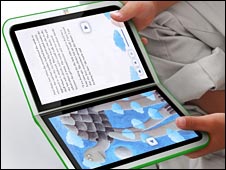
Nicholas Negroponte announced the next revision of the XO Laptop, the low-cost laptop designed by the One Laptop Per Child initiative for developing countries. The upcoming version eschews the typical laptop form factor, instead taking cues from the iPhone and the Nintendo DS to create a unit that opens like a book, has touch screens that can serve as keyboards, and work either in a laptop configuration or wide open as a big display. Here are a couple prototype images:

Ā 

Laptop Configuration

Book Configuration

More information is available at the BBC and on YouTube.

Some Reading For The Summer

Here are a couple of books I’ve quite enjoyed recently:

  • IrresistibleĀ Revolution: Living as an Ordinary Radical: Shane Claiborne, the author of this book, is an interesting cat. He’s passionately devoted to the idea of living according to Jesus’ teachings in the New Testament, especially with regard to the poor and disenfranchised. I particularly enjoyed his accounts of time serving alongside Mother Teresa and as a peaceĀ emissaryĀ in Iraq. He also is engaged in some of the intentional community stuff that I get worked up about from time to time, and so found a particularly receptive audience in me. Stimulating and well worth the time, even if you don’t agree with Shane’s conclusions.
  • Little Brother: Cory Doctorow’s latest, in which a teenage boy runs afoul of the Department of Homeland Security and, after being released from a secret detention facility, decides to try to take the DHS down using a variety of interesting technology and tricks and teaching the reader about them along the way. A very-near-future dystopian novel in the vein of 1984 or Brave New World, I found it very compelling reading. One of the great things about Doctorow’s work is that he makes it available under a Creative Commons license, which means you can download and read his book for free! [Exercise for the reader: compare Doctorow’s insistenceĀ hereĀ that privacy is vital to a free society with David Brin’s insistence that privacy is a lost cause and visibility should be embraced instead in The Transparent Society.]

Do you have any recent favorites? Post them in comments! I’d love some good summer reading.